Product goal
Remove repetitive editing when the script and narration already exist.
The tool targets narration-led explainers, commentary, and news-style content. Audio and at least one image are required; narration text, homepage title, and subtitle are optional. The first image becomes the homepage, later images become content frames, and the result is an H.264/AAC MP4 ready for downstream publishing.
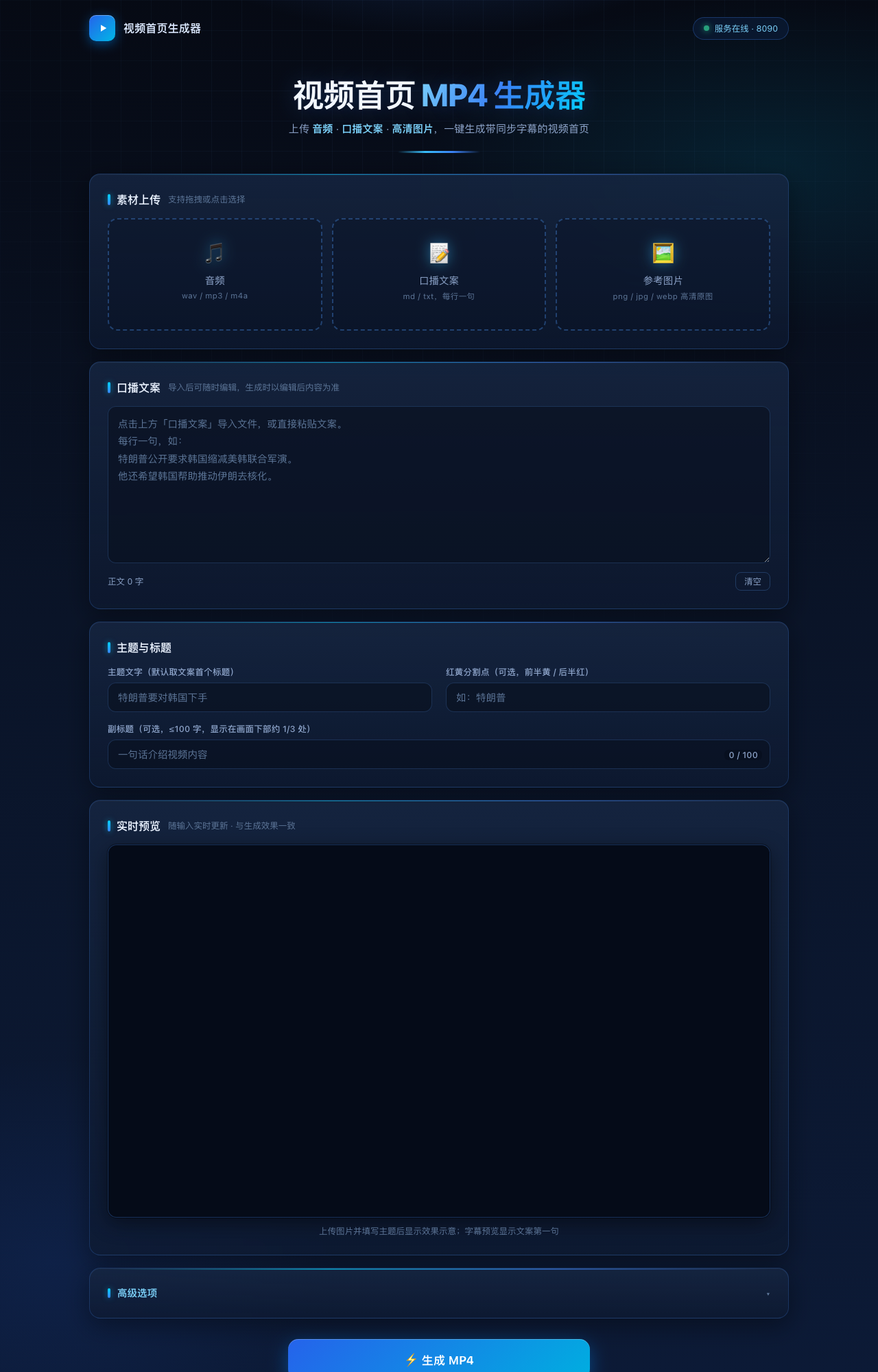
Interface and finished-media evidence
Inspect the workstation, rendered frames, and a playable long-form output.
This is a real long-form literary video job. The generator accepts audio and a homepage image, then composes a landscape MP4 for the full audio duration. The original result runs about 2 hours 58 minutes; the site loads a compressed 12-second excerpt for fast review.


Long-form output excerpt
A compressed 12-second preview from a real finished video. The full task preserves a 2848 × 1600 canvas and approximately 2 hours 58 minutes of source-audio duration.
Architecture
The frontend submits a job; the backend runs four asynchronous stages.
Persistent job states move through pending → running → done, or error. Every job directory keeps inputs, intermediates, logs, result JSON, and the final MP4. The browser polls status instead of keeping one request open.
Input contract
Required and optional inputs.
| Input | Required | Purpose | Rule |
|---|---|---|---|
| Audio | Yes | Narration and total duration | WAV, MP3, M4A, AAC, FLAC, OGG |
| Images | At least one | Homepage and content frames | Upload order is playback order; the first sets auto size |
| Narration text | Optional | Sentence captions | No text automatically disables captions |
| Title and subtitle | Optional | Homepage text layer | Applied only to the first image |
End-to-end flow
The actual execution order from submission to MP4.
- Validate:
POST /api/generatechecks audio, image count, and file extensions, then returns a uniquejob_id. - Parse text: Markdown headings are ignored and body text is split on natural sentence boundaries. An empty sentence list disables captions.
- Set canvas: read the first image with EXIF orientation; auto mode preserves orientation and adds one pixel only when an odd dimension must become even for H.264/YUV420P.
- Render frames: process every image for the target canvas; only the first receives title, subtitle, shadow, and dimming.
- Build timeline: one image covers the whole audio; multiple images play
1 → 2 → … → N → 1, with the homepage capped at three seconds at both ends. - Align captions: detect audio silence and use the longest
sentence count - 1pauses as sentence boundaries. - Pre-render captions: PIL draws each sentence to a transparent PNG and adapts size to avoid the homepage subtitle area.
- Compose once: FFmpeg combines the image stream, timed overlays, and audio into a faststart MP4.
- Validate and export: ffprobe reads duration, dimensions, and codecs; result JSON, player, download, and history update together.
Timeline algorithm
Image duration is derived from audio, not fixed at three seconds.
Let total audio duration be T and uploaded image count be N.
- For
N = 1, the only image duration isT. - For
N > 1, the playback sequence hasN + 1segments because image 1 closes the video. - Each homepage segment is
H = min(3, T / (N + 1)). - Each content-image segment is
C = (T - 2H) / (N - 1).
This avoids negative duration on short audio and gives longer audio to content frames. Caption-free one-image output uses 1 fps, multi-image output uses at least 5 fps, and captioned output uses 10 fps for roughly 100 ms maximum frame-alignment error.
Caption synchronization
Use actual pauses, not equal-duration sentence splitting.
- FFmpeg
silencedetectextracts silence intervals, with defaults near-38 dBand0.15 s. - Leading and trailing silence are removed from candidate boundaries.
- The longest
sentence count - 1pauses are selected, then restored to chronological order. - Each sentence receives an absolute
[t0, t1]range; insufficient pauses produce an explicit corrective error. - Caption PNGs use
overlay enable='between(t,t0,t1)', avoiding cumulative drift.
Captions are disabled by default in advanced options. If no script exists, the backend forces caption-free generation even if the option was selected accidentally.
API calls
The web interface and external automation use the same job API.
Create a job
curl -X POST http://127.0.0.1:8090/api/generate \
  -F audio=@narration.wav \
  -F images=@cover.png \
  -F images=@scene-02.jpg \
  -F script=@script.md \
  -F size_mode=auto
Poll and download
curl http://127.0.0.1:8090/api/job/JOB_ID/status
curl http://127.0.0.1:8090/api/job/JOB_ID/result
curl -O http://127.0.0.1:8090/api/job/JOB_ID/download
The app also exposes /api/jobs for history and /api/job/<id>/video for playback. Output names use the first image's stem, with numeric suffixes instead of overwriting existing files.
Performance and fallback
Use Apple hardware encoding first, then degrade cleanly.
On macOS the preferred path is h264_videotoolbox + aac_at through VideoToolbox and AudioToolbox. If unavailable, the process automatically falls back to libx264 ultrafast + AAC. Adaptive low frame rates avoid encoding redundant frames for static visuals.
FFmpeg and ffprobe are resolved through common Homebrew and MacPorts absolute paths, preventing desktop .app launches from failing because the shell PATH is absent.
Results and validation
Completion in the UI is not the final acceptance test.
- Single-image mode: video duration approximately equals audio duration and the image covers the full track.
- Three-image mode: playback must be
1 → 2 → 3 → 1, with both homepage segments no longer than three seconds. - Auto sizing: output orientation follows the first image; odd dimensions gain only one pixel.
- Caption mode: sentence count, timing, font size, and subtitle avoidance appear in logs or result data.
- Final media: ffprobe verifies duration, dimensions, H.264/AAC codecs, and MP4 playability.
This product is optimized for static images plus narration. It is not presented as a full nonlinear editor; complex transitions, matting, and multitrack editing belong to a different product scope.
Long-video strategy
No arbitrary minute cap; duration is planned around resources and delivery.
Total video duration follows the audio track. The application does not hard-code a 10-minute, 30-minute, or one-hour ceiling. Multi-hour narration can become one MP4 or chapter episodes. Long jobs preserve isolated directories, state, logs, and results; practical constraints are storage, FFmpeg encoding time, playback compatibility, and destination-platform rules.
- Freeze chapter audio and duration before visual composition.
- Use a deterministic manifest for homepage, content images, and captions.
- Generate and probe each episode before optional full-length assembly.
- Prepare aspect ratio, bitrate, size, and episode variants for each publishing destination.
Deliverables
Delivery can be finished videos or a customized automation tool.
- Finished MP4s: provide the script, authorized voice or audio, and images; receive publish-ready media.
- Batch production: generate videos from a topic sheet, script library, or audio directory.
- Custom tooling: add brand templates, aspect-ratio presets, platform profiles, queues, review, and naming rules.
- Complete pipeline: connect IndexTTS2 and create a local script-to-voice-to-video workflow.
Source status
Compiled from the local Flask service, image-rendering script, FFmpeg composition script, product rules, and validation screenshot. Last verified: .